
ONE YEAR OF RUNNING MY OWN NETWORK · UPDATED 8 OCTOBER 2026
The server stayed. The setup evolved.
About a year ago, I turned an old gaming PC into my own home-network gateway. The first version used Ubuntu, dnsmasq, nftables, and a WireGuard tunnel to Proton VPN. Since then, Pi-hole has become part of the everyday setup, and I now run the network without a VPN.
This is the build story and the year that followed: what I put in place, the problems that showed up when real devices used it, what the machine costs to keep running, and the camera-recorder idea I have been working towards.
ABOUT ONE YEAR
Used as part of my home network; this is not a claim of one year of uninterrupted uptime.
CURRENT CORE
Ryzen 7 3700X · 24 GB RAM
Ubuntu Server 26 with GNOME, nftables, and Pi-hole. No VPN in the current configuration.
Over the past few years, the internet has stopped feeling like the free, open space many of us grew up with. Companies want more accounts, more permissions, more data. Governments talk about safety while privacy becomes something ordinary people have to argue for. I got tired of feeling that my only choice was to accept whatever settings someone else had picked.
So I built something I could inspect and change myself. When the first VPN connection worked, it felt like taking back a piece of control. Like boarding up the broken windows of a house I still wanted to live in.
Getting that first working configuration in place took me about two hours. Living with it for a year is a much bigger story. A working tunnel is a starting point. Phones, smart-home devices, DNS, power consumption, software support, and everyday use are what turn an experiment into home infrastructure.

Why I bothered in the first place
I do not want my digital life treated as a product that everybody else gets to trade. That feeling has not changed. What has changed is how precisely I describe what my server can do.
An ISP can observe connection metadata, including destination IP addresses, timing, and traffic volume. Ordinary unencrypted DNS can reveal domain lookups. HTTPS already protects the contents of supported web connections, so it would be wrong to say an ISP can simply read every search term, page, or private message. The websites and apps I give information to are a different part of the picture. HTTPS explained by MDN.
My concern about the UK’s Online Safety Act and the EU debate often called “Chat Control” was part of the motivation. I oppose designs that make inspecting private communication the price of using it. A home gateway gives me control over my network, but it cannot change what a service does with information I submit, or prevent software inspecting data on a device before encryption.
The privacy debate needs accurate facts
Ofcom’s guidance published on 8 May 2026 describes technology-notice powers for terrorism and child sexual exploitation and abuse content, with requirements including necessity, proportionality, and technology accreditation. That is different from a blanket claim that every private message is already scanned. Ofcom’s published framework.
The Council’s 23 July 2026 announcement reinstated an interim EU measure allowing voluntary detection and removal of child sexual abuse material until 3 April 2028. It excludes the specified interpersonal communications where end-to-end encryption is, has been, or will be applied. The announcement discusses a separate long-term framework under negotiation. I can disagree with intrusive surveillance without treating a proposal, an interim measure, and a universal scanning obligation as the same thing. The Council’s announcement.
The server behind it today
I reused hardware I already owned. The machine stopped being just a former gaming rig and became the part of the network where I could make my own decisions.
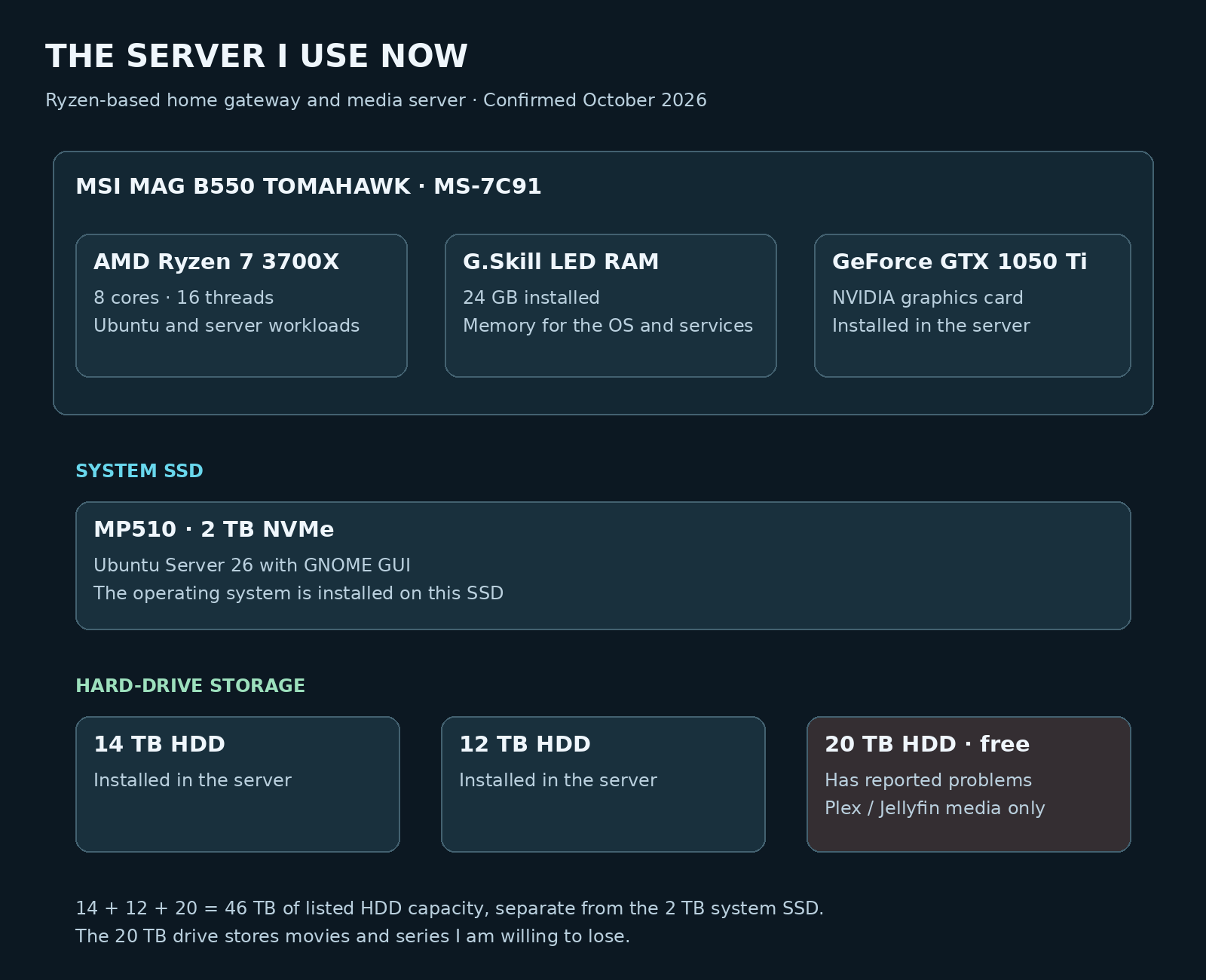
The system I use today is built around an AMD Ryzen 7 3700X, 24 GB of G.Skill LED RAM, and an MSI MAG B550 TOMAHAWK (MS-7C91) motherboard, with an NVIDIA GeForce GTX 1050 Ti graphics card. It handles the network services alongside my Plex/Jellyfin media use. The operating system lives on its own MP510 NVMe drive, with three large hard drives alongside it.
| Part | My current setup | Its job |
|---|---|---|
| CPU | AMD Ryzen 7 3700X | An 8-core, 16-thread processor for Ubuntu and the server workloads. |
| Memory | 24 GB G.Skill LED RAM | Memory for the operating system and services. |
| Graphics | NVIDIA GeForce GTX 1050 Ti | The graphics card installed in the current server. |
| Motherboard | MSI MAG B550 TOMAHAWK (MS-7C91) | The platform for the Ryzen system. |
| System drive | MP510 2 TB NVMe | Ubuntu Server is installed on this SSD. |
| Operating system | Ubuntu Server 26 with GNOME GUI | Server software with the desktop interface I prefer. |
Three hard drives, with a clear limit on the free one
Alongside the 2 TB system SSD, I have a 14 TB HDD, a 12 TB HDD, and a 20 TB HDD. Their listed capacities add up to 46 TB of hard-drive storage. That is the sum of the drive labels; it is not a claim of 46 TB of usable space in a RAID array.
| Drive | What I can say about it |
|---|---|
| 14 TB HDD | One of the hard drives in the current server. |
| 12 TB HDD | Another hard drive in the current server. |
| 20 TB HDD | Received for free because it has problems. I use it only for Plex/Jellyfin movies and TV series that I am willing to lose. |
Why I still use the problematic 20 TB drive
I got the 20 TB drive for free because it has problems. I use it for movies and series in Plex/Jellyfin because those are files I do not mind losing. That is a deliberate limit on what I put there: expendable media, with the possibility that the drive or its contents could fail.
Getting that much storage for nothing is useful to me, but I do not count that drive as a safe place for something I cannot afford to lose.
The Nighthawk belongs to the earlier setup
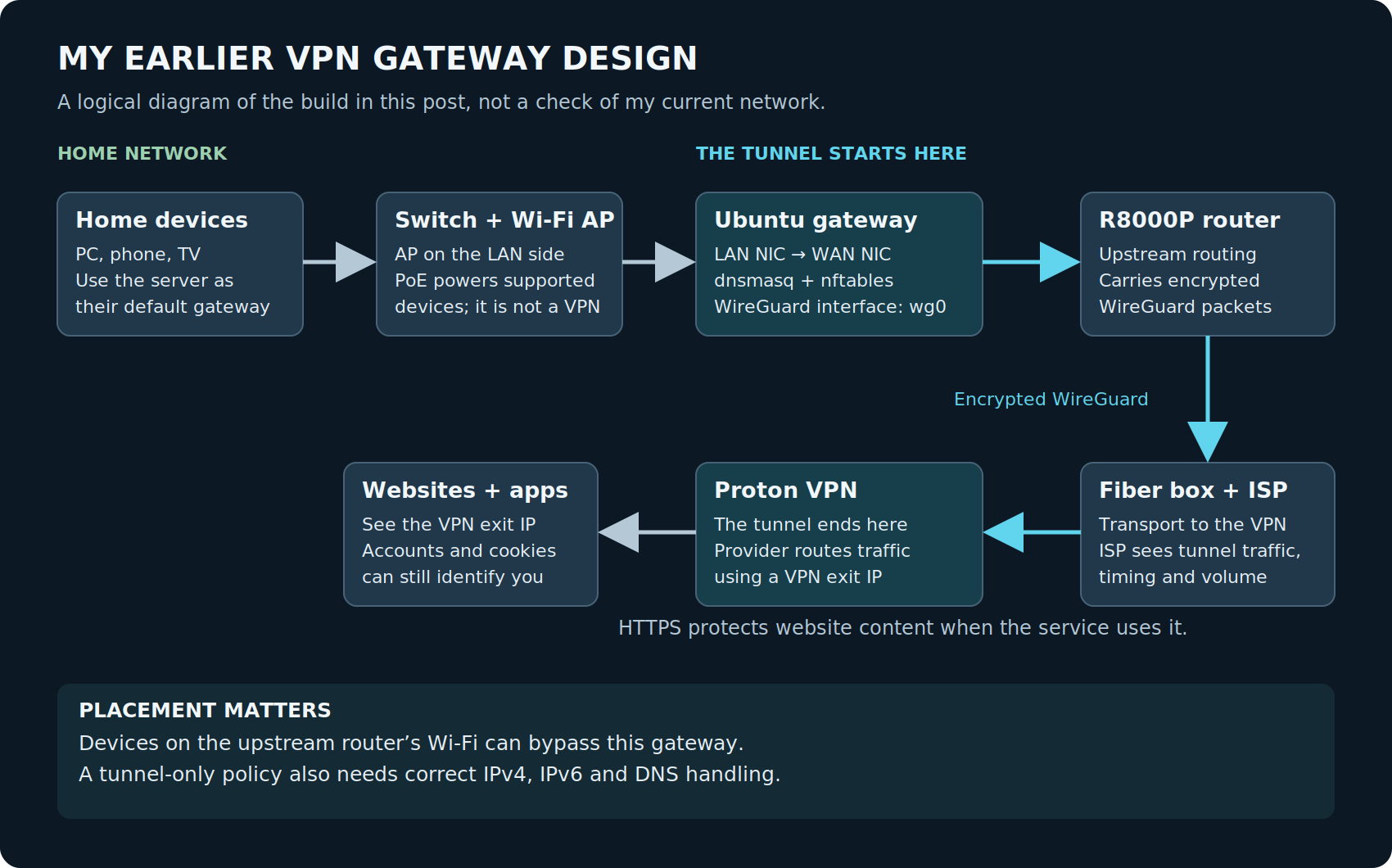
My earlier wired arrangement was main PC → switch → Ubuntu gateway → R8000P → fiber box → internet. Since then, I have given the Netgear Nighthawk R8000P to a friend. It is no longer part of my network. The earlier VPN diagram below records that older arrangement; the current network uses Pi-hole and nftables without that router or a VPN.
The location of a device matters as much as the software on the server. A phone using Wi-Fi upstream of a gateway can have a different route from a wired PC behind it. A PoE switch provides links and power; it does not encrypt or “clean” the internet. The gateway only controls traffic that actually passes through it.
Why I kept a desktop interface
Today I use Ubuntu Server 26 with a GNOME GUI, installed on the MP510 2 TB NVMe. I kept a desktop interface because having a visual way to work on the server makes it more comfortable for me to use. This is my machine, and I want it to be practical for the way I work.
My experience with Garuda Linux and other Linux setups gave me somewhere to start. This project pushed that experience further: interfaces, routes, DHCP, DNS, NAT, and firewall rules. Those stopped being background words on a router settings page. They became things I needed to understand.
The software: separate tools, separate jobs
DNS AND DHCP
The original build used dnsmasq for local network services. DHCP provides network settings; DNS answers name lookups. Pi-hole later added domain filtering and a way to inspect DNS activity.
ROUTING AND FIREWALL
nftables handles firewall rules and the forwarding/NAT decisions in my gateway. It controls packet paths; it does not read and remove advertisements from encrypted pages.
dnsmasq: getting the network organised
Originally, dnsmasq gave me a place to manage local DNS and DHCP. Instead of leaving every device to pick whatever resolver it liked, I worked on directing ordinary DNS through my own server. Choosing an upstream resolver is still a trust decision. A local forwarder does not make the upstream lookup private or encrypted by itself. dnsmasq’s documentation.
Pi-hole uses a DNS engine based on dnsmasq, so these names are related. That does not mean I should casually run two independent services on the same ports and assume they will cooperate. DNS, DHCP, interface bindings, and the current configuration still have to fit together. Pi-hole’s DNS resolver.
nftables: the rules I can read
The firewall was where I wrote the traffic policy for the build. I preferred explicit rules over an unexplained box of defaults. In the earlier VPN design, I worked on sending LAN internet traffic through the tunnel and preventing an ordinary direct fallback when the tunnel went down.
That kind of policy needs proper handling of the server’s own traffic, forwarded traffic, established connections, DNS, and both IPv4 and IPv6. NAT changes addressing; it does not erase an account, a cookie, or a browser fingerprint. A rule that works once is not proof that no leak can ever happen. The nftables project’s basic ruleset example.
WireGuard and Proton VPN: part of the earlier build
I chose WireGuard for the original tunnel and downloaded a Proton VPN configuration. In that build, I used /etc/wireguard/wg0.conf and brought the interface up with wg-quick up wg0. These commands describe what I used then; they are not a complete gateway tutorial. WireGuard quick start.
With that tunnel working and the relevant routes using it, traffic between the gateway and the VPN provider was encrypted. The ISP could still see the VPN connection, its timing, and its volume. The VPN provider became another party I had to trust, and sites could still recognise me through logins or other identifiers.
The current configuration is different
I now use Pi-hole and nftables without a VPN. The old tunnel story belongs in this article because it was part of the build, but my current network is not sending everything through Proton VPN. Pi-hole is DNS filtering, and nftables is firewalling. Neither replaces a VPN tunnel or makes me anonymous.
The year in use: what changed
| When | What I reported | What that tells me |
|---|---|---|
| 2025 · the first build | Ubuntu gateway, dnsmasq, nftables, and WireGuard/Proton VPN. The first working setup took about two hours. | The project started with routing, local network services, and a VPN experiment. |
| 4 September 2025 | The PC beside my TV was the network hub, running Ubuntu 25, VPN functionality, and Pi-hole. I reported roughly 75 W at idle. | Pi-hole was already in use by this point; the power figure belongs to that early report. |
| 4 September 2025 | Matter devices had problems during initial connection, but worked once connected. I suspected Pi-hole. | A real pairing problem, with a suspected cause rather than a proven diagnosis. |
| 2 January 2026 | I described Ubuntu Server 25.04 and manually installing or compiling the software I needed. | A dated software snapshot and my preference for explicit control. |
| 13 August 2026 | The server was my router, firewall, and Pi-hole. I reported about 150–200 W and planned an independent Raspberry Pi recorder. | Power use and dependence on the main server were driving the recorder plan. |
| 19 September 2026 | No VPN. Mobile devices on home Wi-Fi used Pi-hole, and most ordinary DNS was forced through it. | The everyday setup had moved to local filtering and firewall control without the earlier VPN tunnel. |
| 8 October 2026 | Ryzen 7 3700X, 24 GB G.Skill LED RAM, MSI MAG B550 TOMAHAWK, and Ubuntu Server 26 with GNOME on the MP510 2 TB. The Nighthawk has been given to a friend. | The current hardware and storage are confirmed. Pi-hole and nftables remain central; the earlier router and VPN are no longer in use. |
Pi-hole became an everyday tool
The original draft talked about Pi-hole as something I could add. That part is out of date. I did add it, and it became part of how I run the home network. By September 2025 I was already describing it as part of the PC that acted as my network hub.
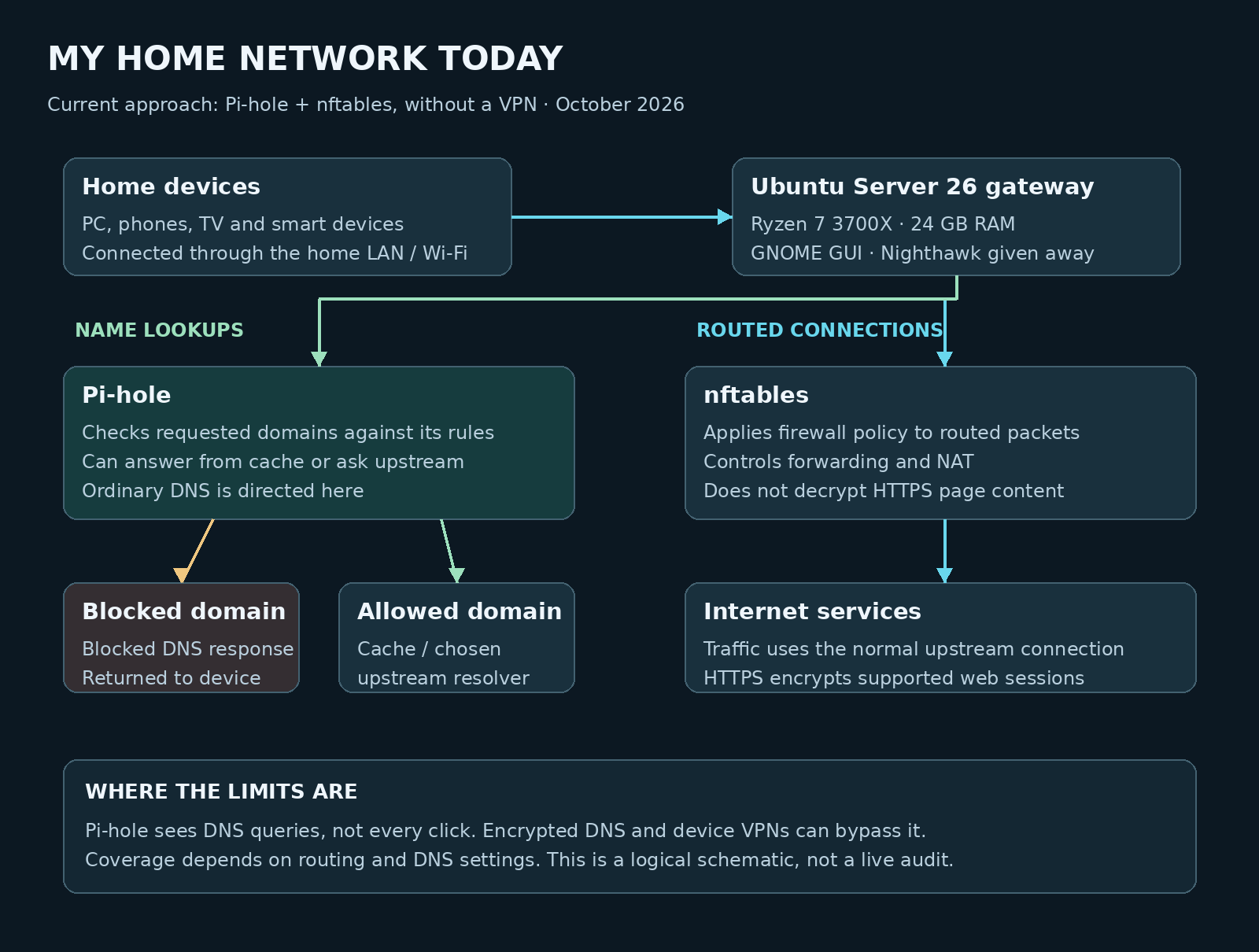
By September 2026, the point was simple: phones connected to my home Wi-Fi used Pi-hole, and I forced most ordinary DNS through it. This made local DNS filtering part of normal use rather than an optional setting on one computer.
That also gives me a way to refuse connections to services I no longer want to use. My position on uploading identity documents to ordinary online services is clear: I am willing to leave a service rather than hand over that kind of information. A domain block can help enforce that decision on devices using my DNS setup. It does not delete an account or recover data already submitted.
What Pi-hole can block
Pi-hole acts on domain lookups. A blocked domain can stop a device finding a destination, and that is useful for many separate advertising or tracking hosts. It cannot reliably remove an advertisement that shares a domain with content I still want. It also does not inspect the full content of HTTPS pages. Pi-hole’s blocking modes.
“Most ordinary DNS” is the careful wording. DNS over HTTPS, DNS over TLS, a device VPN, direct IP connections, or a different network path can change what Pi-hole sees. Blocking traditional DNS ports alone does not solve all of those cases. DNS over HTTPS explained.
Smart-home devices exposed the awkward parts
In September 2025, my Matter devices caused trouble during the initial connection process, then worked after they connected. I suspected Pi-hole because it was part of the network they were trying to use. I did not establish that Pi-hole was definitely the cause.
That is a useful distinction after a year. A failed pairing attempt does not tell me whether the problem is DNS, local discovery, multicast, Wi-Fi, IPv6, a vendor service, or the device itself. It tells me there is a problem to investigate. Checking what was blocked at the time is more useful than declaring the entire firewall guilty.
The server project also lives alongside my Apple TV 4K, Plex/Jellyfin media use, and Matter/Eve smart-home devices. Local media and devices I want to keep using are part of my daily setup too. I have to make the network work for the things I actually own.
The cost I could not ignore: keeping the PC powered
Reusing the old PC meant I did not have to buy a new gateway computer for the first build. That does not make it free to run. Electricity is a recurring cost, especially for a machine that also acts as the router, firewall, and DNS service.
My earlier report was roughly 75 W at idle. In August 2026, I described the server as using about 150–200 W. Those are different reports at different times, with conditions that are not established as directly comparable. I cannot use them to claim that the server doubled its idle consumption, or that it stayed at one load for an entire year.
| Constant power assumed | 24 hours | 30 days | 365 days |
|---|---|---|---|
| 75 W | 1.80 kWh | 54 kWh | 657 kWh |
| 150 W | 3.60 kWh | 108 kWh | 1,314 kWh |
| 200 W | 4.80 kWh | 144 kWh | 1,752 kWh |
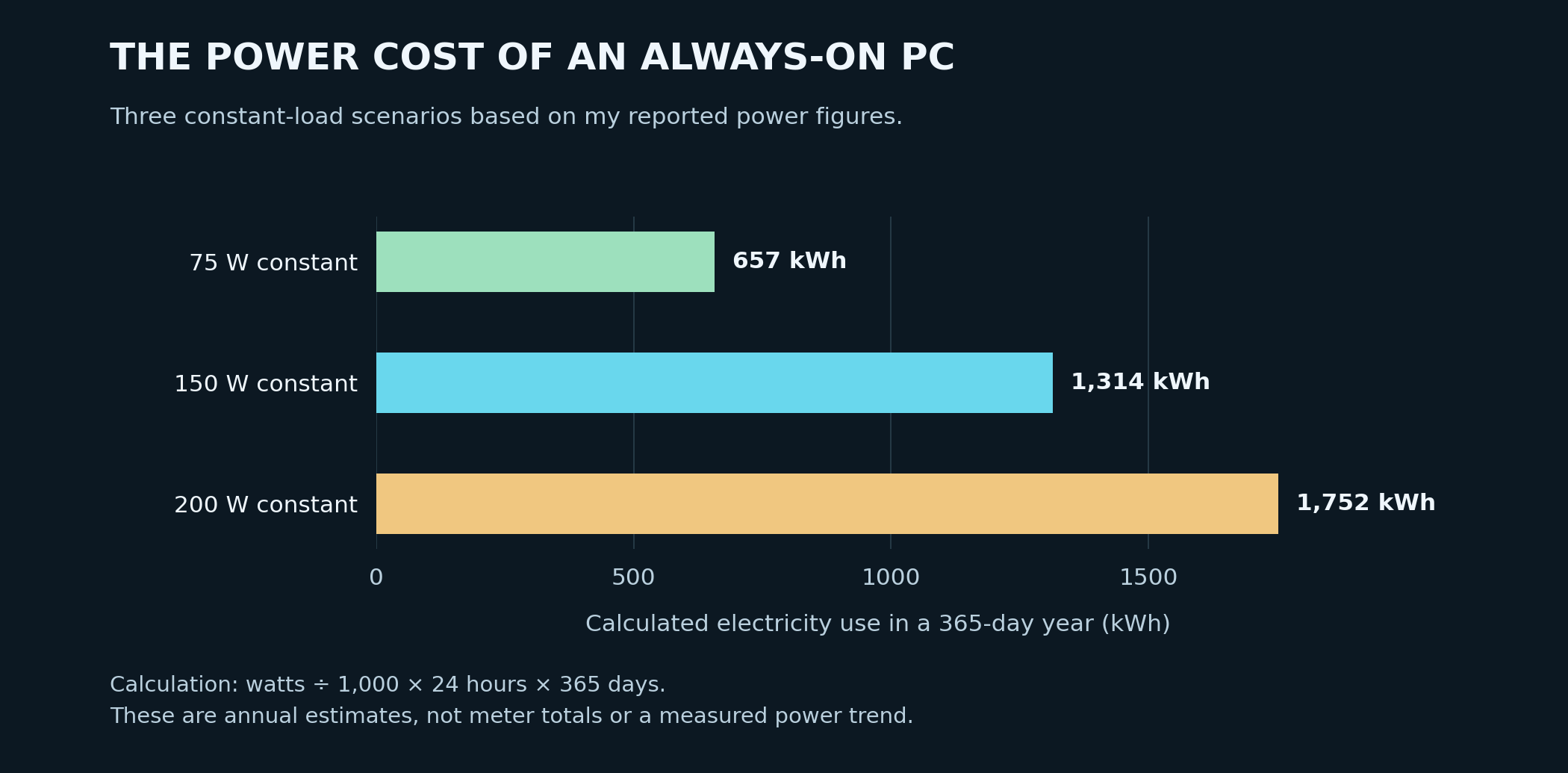
The numbers explain why I started thinking about shutting the main server down while I was away. At a constant 150–200 W, eight hours off per day would avoid 1.2–1.6 kWh per day for that machine, before allowing for the power used by any replacement equipment. That is a calculation, not a saving I have already measured.
There is a catch: this PC is infrastructure. Turn it off and the routing, firewall, and Pi-hole services it provides also stop. I cannot describe that as a seamless energy-saving change for every device in the house. It is the reason I wanted some jobs to have an independent path.
The next idea: a camera recorder that can stand on its own
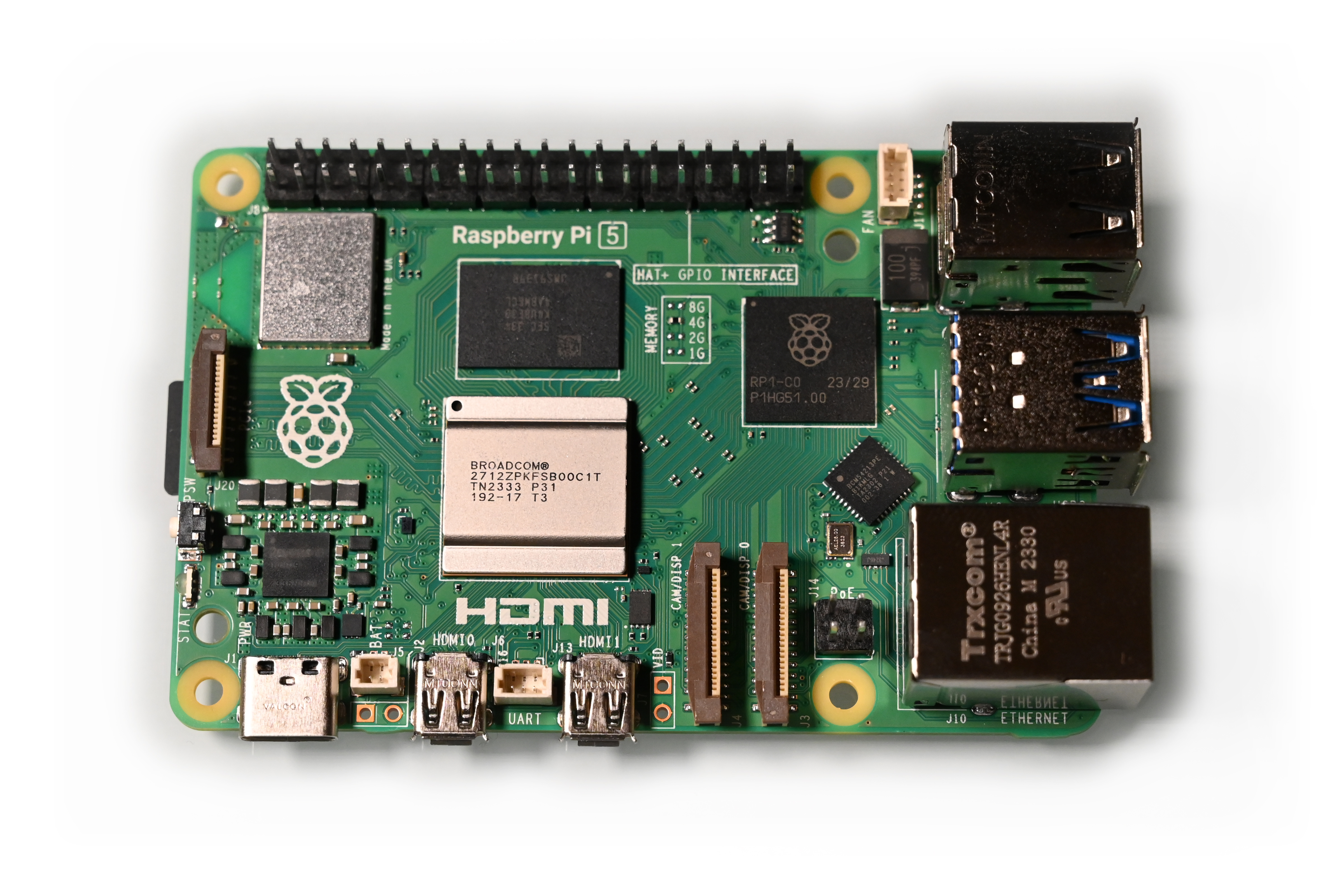
In August 2026, I worked through a plan for a Raspberry Pi with M.2/NVMe storage acting as an independent network video recorder. The cameras and a PoE switch would use a local network with fixed addresses. The recorder would keep storing footage locally, even while the large server was off.

THE GOAL
Keep camera recording independent of the large PC. Use the Pi’s Wi-Fi to reach the normal home network when the main server is available, then move verified footage onto the server.
This was the plan I discussed in August. I am keeping it as a plan here rather than claiming that a complete recorder is already installed.
The storage rule matters to me: copy the recordings to the server, verify the copies, and only then delete the originals from the Pi. That keeps local storage from filling up without deleting the only copy because a transfer merely started.
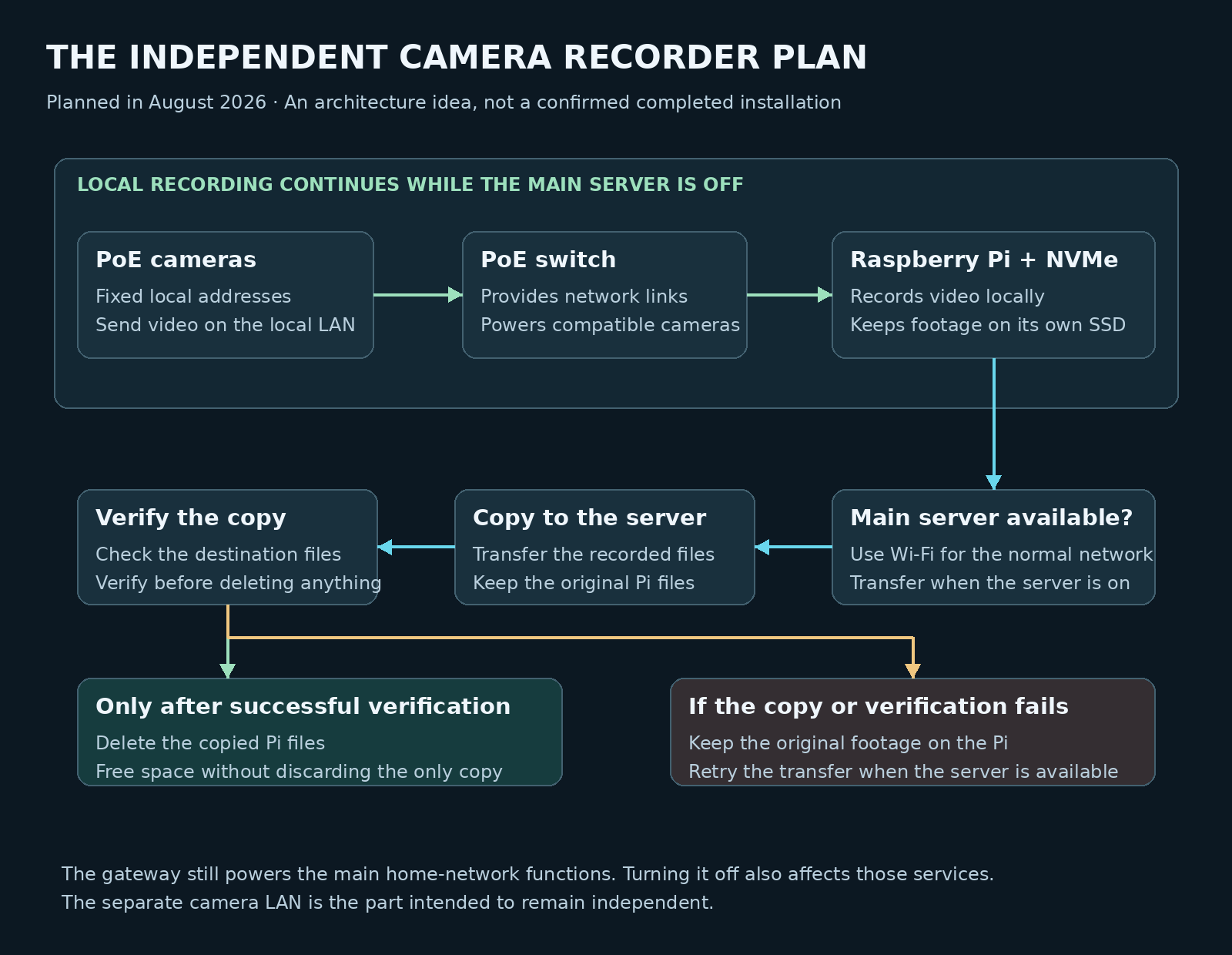
The local camera network is the part intended to keep working independently. It does not magically keep the rest of the home internet online when its main gateway is shut down. Separating those jobs is a useful design decision, but it is still work that has to be implemented and tested.
What a year taught me
WHAT WORKED FOR ME
Central control. I have a place to manage routing, DNS, and firewall decisions for the devices that use the gateway.
Useful old hardware. A former gaming PC became something I could use and learn from.
A visible system. I can look at the services and settings instead of guessing what a sealed appliance is doing.
WHAT NEEDS ONGOING WORK
Maintenance. Software support, configuration backups, reboots, and troubleshooting remain part of owning the system.
Compatibility. A blocked request can be unwanted tracking or something a feature needs. The answer is in the evidence.
Power and dependence. An old gaming PC can do the job, but running it continuously has a real cost.
I was considering a Ubiquiti U7 Lite in the original draft because the server itself was not a Wi-Fi access point. That remains an earlier idea in this account, rather than a claim that I bought and installed that particular model. What matters in the design is that the intended Wi-Fi devices use the right network path and DNS settings.
The operating system has moved on too
In January 2026 I described Ubuntu Server 25.04. Today my server runs Ubuntu Server 26 with GNOME on the MP510 SSD. The January entry stays in the timeline as part of the history; the current hardware section reflects the system I use now.
The statistics I can honestly put in this article
I can show the hardware I used, when I reported particular changes, and what the reported power figures would mean at a constant load. I do not have a current Pi-hole export in this post, so I am not going to invent a “million trackers blocked,” a blocking percentage, a speed improvement, or a year of perfect uptime.
| Useful measurement | What it can show | How I would read it |
|---|---|---|
| DNS queries and blocked queries | The requests handled by Pi-hole over a stated time period. | Blocked ÷ total × 100 gives a DNS-query blocking rate, not the percentage of all tracking stopped. |
| Query history by device | Which clients request particular domains and when. | Useful for a pairing or app problem; it is still a DNS log, not a complete browsing history. |
| Wall-socket power | The electrical load under a stated condition. | Separate idle, active use, and daily energy before comparing reports. |
| Availability and restarts | When the gateway was actually running. | One year of ownership and use is different from 365 days of uninterrupted service. |
The personal payoff
The best part of this project is still the feeling I had at the beginning. I see the PC beside the TV, and I know it has a job I gave it. I can read the rules. I can change the DNS policy. I can choose a service, decide I no longer trust it, and do something practical about that decision.
A year later, my setup has changed. The VPN is no longer part of my current configuration, and the Nighthawk has gone to a friend. Pi-hole remains part of the Ryzen-based server, alongside Ubuntu Server 26, my storage, and Plex/Jellyfin media. Power use has become part of the conversation. So has keeping camera recording independent of the main server. That is what using a system does: it shows me what matters when it is part of everyday life.
I am still angry about how casually privacy gets traded away. I am also better at separating what a network tool can control from what it cannot. Accounts, cookies, fingerprinting, and information I choose to give a service remain part of the problem. MDN’s overview of web privacy.
My network. My rules. My responsibility.
I cannot control the entire internet. I can understand more of the part that reaches my home, make decisions for myself, and keep improving what I built. After about a year of using it, that still means a lot to me.
Sources and image credits
My build and dated experiences come from my own account and later project discussions, including my current hardware and storage details confirmed on 8 October 2026. Technical references and credited images are linked where they are used. The external hardware photographs are illustrations, not photographs of my own equipment. The schematics show the current server hardware, the earlier design, the current logical approach, and the recorder plan. The power chart shows calculated scenarios.