

Audiobook Shelf Manager has moved on quite a bit since my last update. Version 1.49 is now available as a public pre-release on GitHub, bringing MP3 and M4B support together with more detailed ratings, listening statistics, separate libraries and a lot of work on speed and reliability.
I am still working on it. Alongside the desktop program, I have already started building a local, browser-based interface. I think a website-style UI gives me more freedom to make the library look good, and I want it to become easier to set up and use. I may move further in that direction as the project develops.
This continues the project I covered in my earlier Audiobook Shelf Manager article. That post records the desktop version at an earlier stage. This update covers the progress since then, including the web preview I am working on now.
MP3 and M4B in the same library
One of the biggest additions in 1.49 is support for unencrypted M4B audiobooks alongside MP3 files. The scanner, metadata editor and renaming workflow can now work with both formats. An M4B containing multiple chapters is treated as one audiobook in the collection.
Editing M4B tags and cover art preserves the audio and the existing chapter names and timings. It does not need to convert or re-encode the audio just to change the information attached to it. That matters when I have an organised audiobook and only want to correct its title, author, series or cover.
The metadata handling has also become clearer. A narrator tag takes priority, with Composer available as a fallback for older files that used that convention. Author, narrator and translator can be recorded separately. The aim is to keep the people involved in a book correctly identified and make that information useful when browsing the collection.
Separate libraries, with settings that fit each collection
I can now create separate named libraries, each with its own folders, listening history, ratings, settings and backups. Several folder roots can feed one library when I want a combined overview. Separate libraries keep their records apart, and switching between them does not move or copy the audiobook files.
The existing Main collection is preserved during the move to this structure. It gives me room to organise different collections without having every setting and every listening record mixed together.
Genre checks are more flexible too. I can choose Exactly, At least, At most, Between, or No count rule, either for a library or as an override for a particular series. The default can still be exactly ten tags, but it is a preference I can change. A warning points out an entry that needs attention. It does not invent extra genres to fill the count.
The cards are more configurable. Ratings can be shown or hidden and placed in different corners. Ownership, completion, Goodreads review status, Audible review status and a general Reviewed flag can be displayed independently. Dates and day counts can also be adjusted. I want the overview to show the information I actually use.
Ratings with the precision I want
I can enter a personal rating such as 3.61 out of 5 and see both the number and its fractional star display. That gives me room to record the score I mean when a whole-star rating feels too broad.
Those ratings also help with the larger overview. A series average uses the books I have rated. A writer’s rating averages their rated series, giving each of those series equal weight. Unrated entries are left out, and listening to the same book again does not give its rating another vote. Writers can be sorted by rating, making the information useful beyond an individual book’s page.
Listening history and a proper statistics workspace
The statistics area now has Listening, History, Collection and Year recap views. I can explore completed listens, distinct books, relistens, favourites, ratings and audio hours, then look at a particular year or month.
Listening entries can include start and finish dates and a note. Repeated listens remain part of the history, so returning to a book does not have to erase the earlier occasion. The date calculations count a listen started and finished on the same day as one day.
Audio hours are calculated from known book lengths. A chosen playback speed can provide an estimated listening time. I still enter the listening records myself, so those figures depend on the records and durations available. The program is a collection manager, and it does not measure playback in another app.
History can be filtered by title, author, narrator, genre, rating and completion date. The Collection view follows the files currently available in the library and can compare them with lifetime completion records. Choosing a listening year leaves the current ownership record intact. A book going offline or disappearing from its folder can keep its saved listening history.
Finding the next book and seeing what is missing
The Find books view, available with Ctrl+F, adds another way into a large library. I can narrow the collection by genres, decide whether a book must match all selected tags or any of them, and explore release years, purchase sources and books without a recorded finish.
Missing-book information has become more careful. It uses the expected series total and reliable book numbers to work out the gaps. If those values are unknown or conflict, the uncertainty needs to stay visible. The expected count is still information I maintain for my collection. It is not a live catalogue of every audiobook an author has released.
I can also record when and where I bought a book. The owned-for calculation uses the purchase date I enter. An unknown purchase date stays unknown. These personal records live in the local database and its backups, keeping purchase information separate from the audio file’s descriptive tags.
Covers appear sooner, and repeat scans do less work
Browsing has received a lot of attention. When I open a series, its visible book covers load first, in the background, before the remaining artwork. Covers, ratings and status can appear on the cards without opening every book individually. Book Details can reuse prepared artwork while it is still current, while personal ratings and history are refreshed from the database.
Unchanged rescans avoid rewriting the scan index. The program also avoids repeated directory searches and unnecessary writes of unchanged history when opening a known book.
The 20 November performance review includes a controlled benchmark using 576 short test audiobooks, split equally between MP3 and M4B, across 24 series and 12 authors. With mixed artwork, the median of five unchanged rescans changed as follows.
| Measured operation | Before | After |
|---|---|---|
| Unchanged rescan, with mixed artwork | 0.4399 seconds | 0.0427 seconds |
| Directory listings during that rescan | 2,724 | 60 |
| Scan-index writes during that rescan | 1 | 0 |
The test measures repeated scanning under those conditions. A first scan, a large real audiobook file or a slower external drive involves different work. For me, the useful change is that checking an unchanged collection now avoids much of the repeated work it used to do.
Safer saving, clearer removal and recoverable records
Saving now shows progress and verifies that an embedded cover can be read back. A failed cover check can be retried once. If verification still fails, the operation reports the problem and holds back the success message and follow-on rename. File operations have also been moved away from the interface thread to help keep the window responsive.
Removal controls separate deleting a saved book entry from moving an existing audio file to Trash. The file-removal checkbox starts unchecked each time. A missing file can retain its history until I explicitly choose to remove the saved entry.
Backups are part of the permanent application data, independent of temporary build directories. There are selected-library backups and automatic daily database backups. The reliability work also covers safer JSON and database saves, filename collisions, associated cover files and preserving book identity when files change.
For troubleshooting, local diagnostics can export application, operating-system and Flatpak version information along with timings for scans, artwork and opening books. Reports leave out file paths, book titles and listening history, and are not uploaded automatically.
The next direction is already taking shape in the browser
I have already started a local web version because I want more freedom over how the library looks and how I move through it. I like the visual approach of browser-based media libraries. A familiar page layout, recognisable covers and room for the book’s information make sense for the way I want to browse my collection.
The current preview follows Author → Series → Audiobook → Book info → Edit. There is a proper information page before the editor, so I can open a book to read its description and inspect its details. Searching and genre filtering are available as I move through the library.
The screenshots here show the local web preview in development on 21 November 2026. It already uses my collection and the existing manager backend. The interface shown is in Danish.
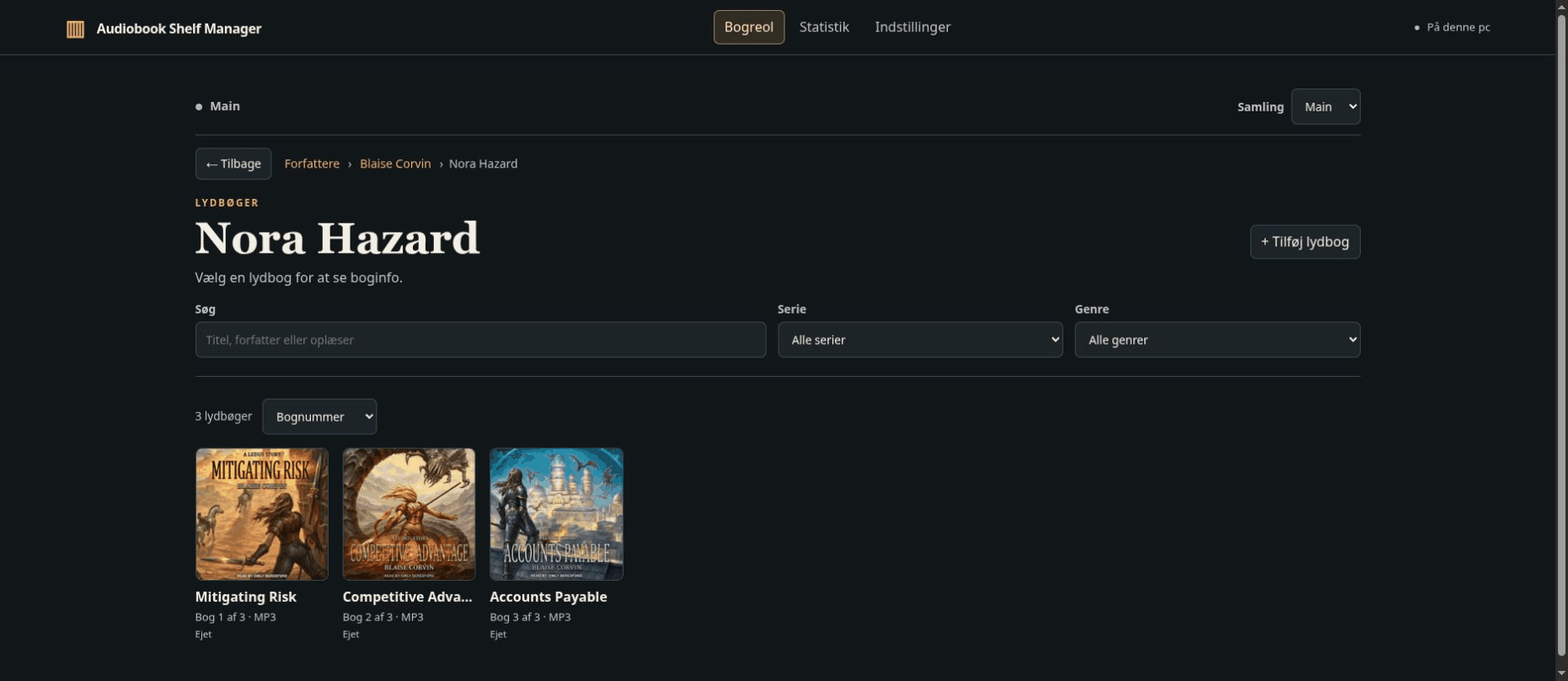
The book-information page brings together the cover, author, series position, narrator, release date, duration, format, description and genres. Personal information such as rating, purchase details and listening history is available alongside the book record. In the Nora Hazard example, the three books have their own covers and positions within the series.

The web editor already separates Book information, My book and Listening history. I can work on metadata and cover art, enter precise ratings, manage favourites and review flags, record purchases, and add or edit listening entries. Saving writes and reads the changes back, then returns to the same book. Cancel drops the pending edits, and the preview warns if the book has changed elsewhere before an overwrite.

There is also work on importing a local audiobook into an existing or new author and series, copying the file while preserving the original. The preview has collection switching, settings, statistics, backup and maintenance controls. Its chat-assistance workflow can copy a descriptive book card for a proposed metadata update, which I can review before saving.
This browser version is still a local development preview. It opens on the same PC, works with the existing desktop backend and does not currently provide access from other devices or an audiobook player. The public 1.49 release remains the Linux desktop source release. The web interface has not yet become a finished public replacement.
Making setup easier is one of the reasons I am exploring it. The preview can start against an existing supported installation and open the library in the browser. I am already working through that approach, but the layout, startup and everyday workflow still need development. I may move more of the project to this style of interface as I see how it works in practice.
Where this fits in the project
The earlier posts show how the project reached this point. The original manager established the visual collection, editable information and my own listening record. The theme work explored how I wanted that library to feel. The desktop version brought the project into a Linux application, and the current work is building on the organisation and records behind it.
- My Custom Audiobook Metadata Manager — the original project and the collection problems that started it.
- Audiobooks Metadata Manager — the earlier tool’s library, metadata and file-organisation work.
- Building Dark Mode and Winter Mode — the design work in the earlier interface.
- Audiobook Shelf Manager — the earlier desktop and Flatpak stage.
Getting version 1.49 and following the work
The code is available in my AudiobookShelfManager GitHub repository, under the MIT licence. The 1.49 pre-release page has the download and release notes, and the README explains the Linux setup.
This is a source release. The documented options include building the Flatpak or running the Python application. The Flatpak uses the existing application ID, so an upgrade keeps its application data. I would still make a backup from Settings before upgrading. The manager works with supported local MP3 and unencrypted M4B files.
I will keep working on the parts that make a difference when I actually use the library. That includes getting the information right, keeping the records dependable and making the collection comfortable to browse. The web UI is already part of that work, and I want to see how far I can take it.
The screenshots show my local web preview on 21 November 2026. Book-cover artwork visible within them belongs to its respective rights holders. The featured image is an AI-generated editorial illustration.